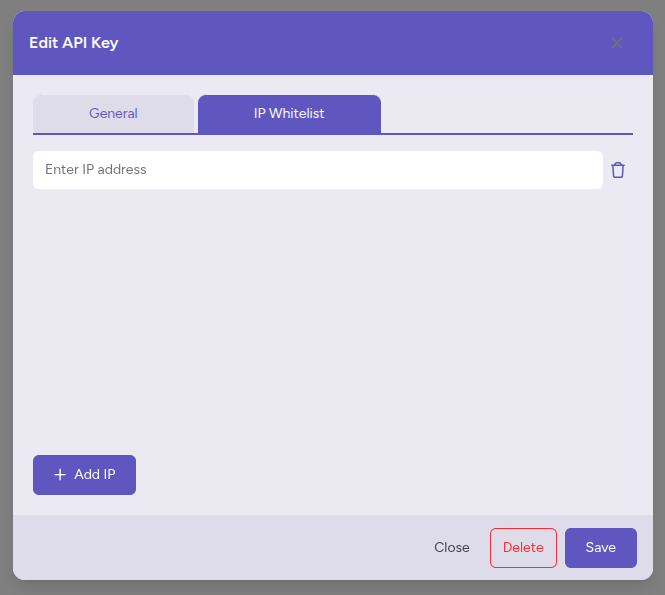
The Fig Markets API implements IP whitelisting as a security measure to ensure that only authorized IP addresses can access your API credentials. This feature helps protect your account from unauthorized access and potential security breaches.
IP whitelisting is optional. An API key with no whitelisted IP addresses can be used from any IP address. Once you add an IP address to a key's whitelist, the key is only accepted from the IP addresses on that list.
- Per-API-Key Basis: Each API key has its own whitelist of allowed IP addresses
- Exact IP Matching: An address must match exactly, as the server sees it; ranges and CIDR notation are not supported. Enter an IPv6 address in the same form your requests arrive from.
- Real-time Enforcement: IP checks are performed on every REST request and on WebSocket authentication
- A REST request from an IP address that is not on the key's whitelist is refused with
401and{"code": 401, "message": "IP address not whitelisted"}. - A WebSocket
authfrom such an address fails with a JSON-RPC error with code-32001.
To manage your IP whitelists, log on to the Fig Markets trading platform, click on your account name in the top right corner and select API Keys from the dropdown menu. Adding IP addresses needs a trader admin login; other users can view the whitelists.
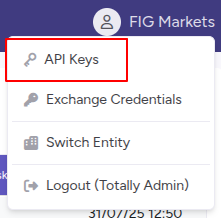
You will then see a list of your API keys, click on the API key you want to manage the IP whitelist for and select the IP Whitelist tab.
You will then see a list of your IP whitelists, click on the Add IP button to add a new IP address to the whitelist.